
Happy 2nd Month Anniversary!
I pretty much took a 1.5 week break from this game…. only to come back. -sigh-. TGUI has been forcefully ripped out of the engine. As mentioned before, TGUI/TB does NOT play well together in any way, shape, or form. This means, that I am stuck with the Window’s hDPI. For those of you whose game sorta bleeds out of your monitor, see the previous post concerning where to change the scaling.
While the main window of the game client is 1080p. The map portion of the game will be around 720p. However, I am seriously considering breaking out the chat window (and possibly others?) out of the main client so you can have chat on one monitor, and the core game on the main monitor…
As you saw in the previous video, player blue square moving around with npc red squares moving around. I think I might stick to that until I get the sprites the way I want them. I am envisioning the first release to have chatting, movement, and map scrolling.. I guess the player square would need a name over them.. hmm..
Last post before the break
It’s been sort of a fun run. Learned a lot. But right now, creating a modern 2d game (doesn’t matter if it’s a MMO or not) with 2d UI is too much of a time sink and not yet possible with the goals I have in mind (twinbasic + sfml + tgui). The TGUI/TwinBasic combo is extremely volatile and wildly unstable.
I have absolutely zero interest going back to Winforms due to the horrendous hDPI issues, although, I may reconsider a little farther in the future. Right now, I can retire at -any- time. Or wait a few more years for a full retirement. Nonetheless, I am putting this on the side to place my focus back on Osinia. www.osinia.dev
10 days? Has it been 10 days?
Wow, a lot of time has passed. Yikes! Been testing some stuff because the dpi issue doesn’t sit well with me. It wasn’t an issue in the olden days but now days with hdpi monitors being the norm, it is an absolute issue. In short, what you will see below is in progress but I’ve been working on opengl (sfml) implementation to replace directx. While this adds more dlls to distribute, the size difference isn’t too bad, a few more MBs.
I have also migrated from WinRT for the audio to SFML Audio. Ironically, that makes the migration path from MCI to BASS to WinRT to SFML Audio. Changing underlining audio engines isn’t bad if your code is abstracted properly, so that’s something, I suppose.
I’ve added scrolling maps. Currently working on day/night cycle and static/dynamic lights. Also working on integrating TGUI so that all of the UI are with-in the game window. That is the piece that should remove the DPI issue for good. Also on my list is a minimap.
Ironically, in order to use SFML and TGUI, I needed C-API bindings. Then I make Basic bindings on top of the C bindings.. Game still run nicely as you can see below. Also, the frame rate has been unlocked so you are not bound by that. You will notice below that the framerate is a bit… low at the moment. That is because I am drawing everything I can, when I can. There are some major optimizations I need to work on as the game matures.
Below is just a mp4 video showing an update:
(Edit):
I should note that using TGUI is a possibility. Unfortunately, it’s examples, headers, and real DLL exports are all over the place in v1.12, that none of those three matches the other two.
Debug = Time Sucking EVIL
I’m telling ya… Most of the time “programming” is actually debugging either your own bugs or framework bugs (.net) or compiler bugs (C# specific). It’s always a pain, no matter what.
I spent 4 fricken days debugging an issue that turns out to be a bug in the System.Drawing .net library that was introduced in v10.x, aka last November (2025). Spent most of yesterday writing work arounds. This is what I get for using .Net/C# to create a map editor. Thankfully, the client side engine is almost far enough along where it would be easy to write the map editor in basic. Would I do it, though? Probably not. C# has decades of QOL features that makes such a port a non-starter.
Still though, 4 days wasted because Microsoft stopped testing its AI generated slop code in this version of visual studio and .net. ugh.
Added special tiles (blocks, etc) conversion and loading in the engine (when I say engine, i mean the game/graphical engine on the client side). This is useful so that the client can determine if a player can move onto a certain tile or not and NOT move the player and NOT send the movement packet if they cannot move there. Saving a little bit of network traffic…
So, back in October 2025(ish). I finish building my “retirement” machine. It was meant to be the end all of machines (until something faster comes along). Supposed to be powerful enough for programming, 4k video editing/special fx, 3d modeling, 2d drawing, the works. And it is working out fine. HOWEVER, the issue… it is not the target machine for players. The target machines are usually laptop specced.. so… I bought a laptop as well just to keep me in the realm of reality of my target audience.
My development machine (custom built) has the following specs:
CPU: Intel Core Ultra 9 285K
RAM: 128 GB
GPU: NVIDIA GeForce RTX 5080
Running at a modest 982 fps:
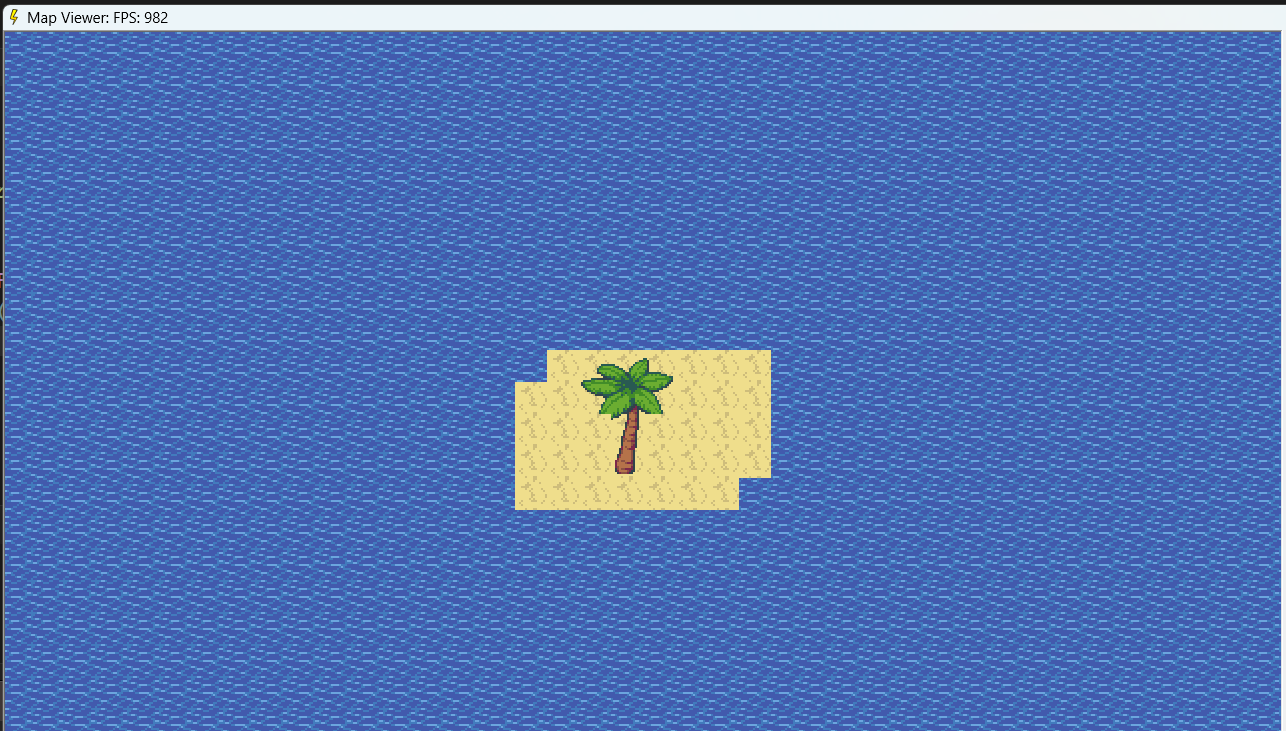
The laptop is running the following specs:
Lenovo Legion 5i 16" Gaming Laptop
CPU: Intel Core i9-14900HX
RAM: 32 GB
GPU: GeForce RTX 4060
Running on a modest 907 fps:
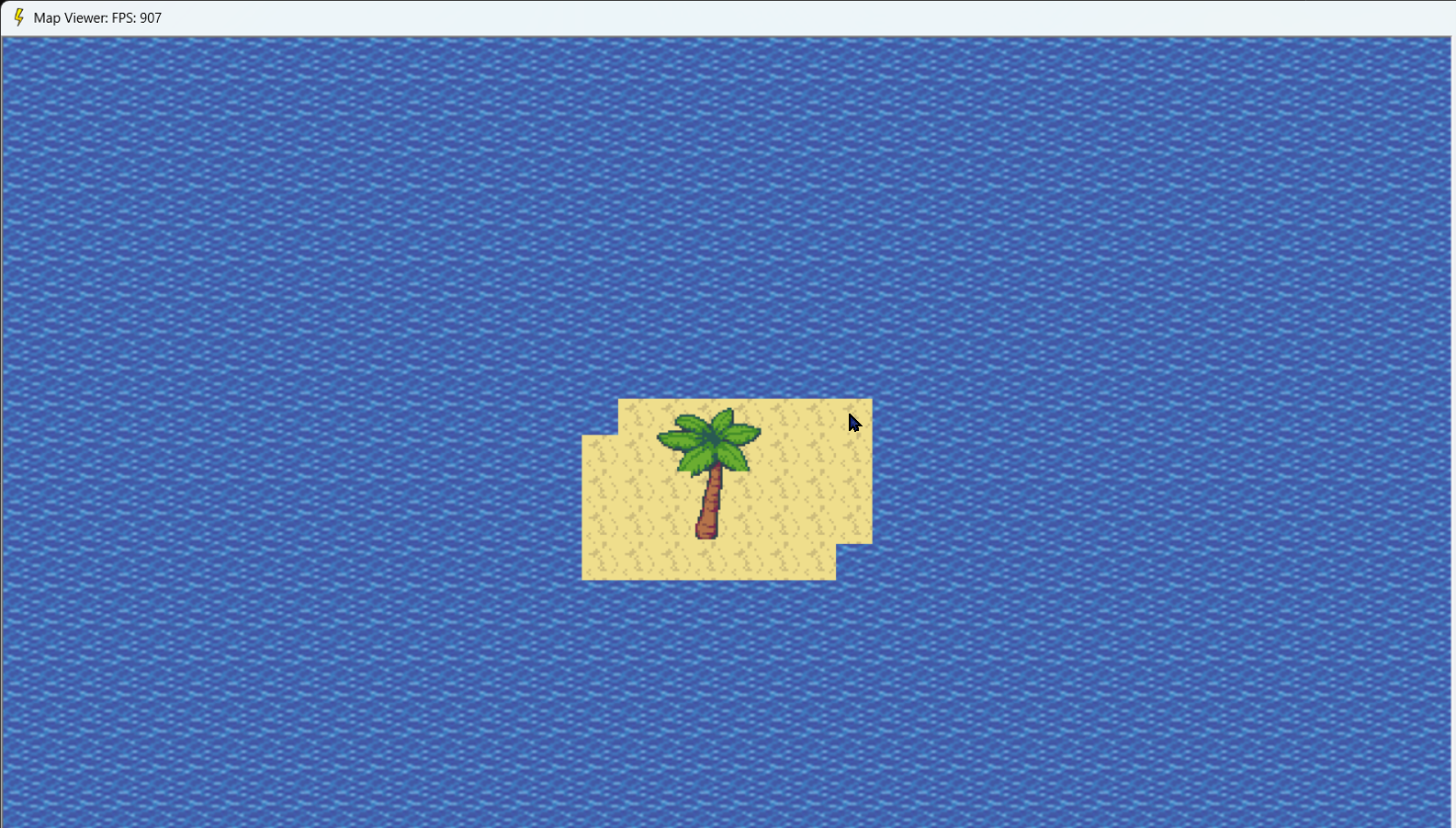
Mind you. DPI is a massive issue with basic languages. My laptop came with the default scaling of 150%, which is normal, else everything is super tiny on the screen. However, DirectX and TB doesn’t play well with DPI at the moment. So if the game renders weirdly on your computer, check the DPI scaling..
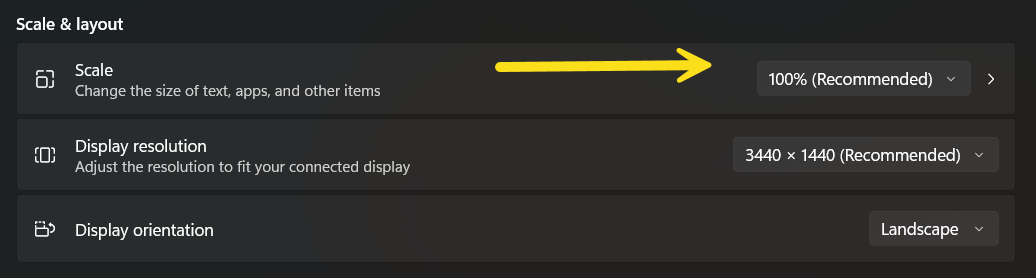
This alone might make it worth switching over to SFML for both map rendering and in-game controls. I know that renders properly across resolutions. However, it comes with dependency files. But it might be worth the switch.. Perhaps in a future version…
Last but not least. I added the itch.io link to the top of this page. It’s password protected.. and the password is… x. There is nothing there to download at the moment, but that should change soon. Mind you, when it comes time to download, you need to download/install via itch.io client. The game must also be ran from the itch.io client (and soon, steam client). It won’t run otherwise (I think).
Character fun!
Well, I know I said I wanted to release the first build showing a map and providing the ability to chat in game. However…
In order to chat, you need a name. In order to have a name, you need a character… Characters require a class.. In other words, I need the character creator portion ready in order to release… sigh.
Due to the above, I’m like.. well…. might as well get character sprites in the game and moving around. Since character sprites (character sets) are used for players, npcs (shops, quest givers, etc), and mobs (enemies), might as well get that system implemented now.
So.. that is what I am working on during these sessions. This means the first build will have character creation, chatting, and movement.
The little engine that could... aka Happy One Month Anniversary!
First, and most importantly. Happy One Month Anniversary! I started this little project exactly one month ago. While, you didn’t get to see squat during that time.. I am quite happy with my progress :)
Got a few questions as to why it takes me a long time to work on things compared to most (like.. 90%) developers. The answer is simple. I wrote my game engine from scratch. Most developers uses a pre-built engine. Unity, Unreal, Godot, and many others. Working with a pre-built engine provides -many- advantages. One of which, is a ramp up time to content building. They also provide disadvantages such as bloated file sizes, multiple dependencies slow workflow and the like (comparatively).
Since I am the sole developer, and this game is a simple 2D MMO, that runs on a single OS (Windows 10+), using any pre-built engine is simply overkill for this game. I want to be in complete control over size and speed. And since this game runs on a specific platform with specific criteria, a small game engine is good enough. Mind you, what I just said is specific for this game. My other projects uses a pre-built engine :)
So I’ve been working on the map viewer to flesh out a compartmentalized game engine. Meaning, I work on the engine with-in the map viewer that is plug-and-play into the game client with 3 lines of code. The sample map I am working on has the 12 layers of animated tiles and some special tiles in it (player blocking, npc blocking, etc). I use a simple ini format as a transient format between C# and Basic. While I could use JSON, basic is a bit clunky working with JSON files, ugh.
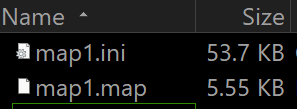
The .map file is the file the client reads, while a future .dat file will be spit out for the game server to read. The transient file is 10x bigger than the finished client map file. The .map it loads much faster… as binary files should compared to text files, and ini files at that.
On disk, space (binary + assets) is under 70 MB (so far) while RAM is under 100 MB. Even though this is a little game, it still uses less space on disk and ram/memory than other non-mmo 2d games (so far). My aim is to keep this small and fast, so I gotta stick to that..
Before I show off something, I can’t believe I never mention which Basic dialect I am using. It’s twinbasic.com … In short, this bad boy is the brainchild of a mastermind. Twin Basic will read and write Visual Basic 6 code as well has lots of QOL. To name a few… 64bit support, no runtime libraries needed, can cross the bits (32bit apps access 64bit controls), etc. Even though Microsoft abandoned Visual Basic.. twice!!!!! First time “classic” with VB6, and second time with VB.Net (with extremely minor upkeep). Twin Basic is basically the spiritual successor to Visual Basic 6.
With all the above said, I can finally show off the ugly starting/temp map below. Please note, each animated tiles can hold up to 60 frames since I am FPS locking to 60. I am only showing off 2 frame animation at the moment due to the tileset I am using consists of 2 frame animations.. errr..
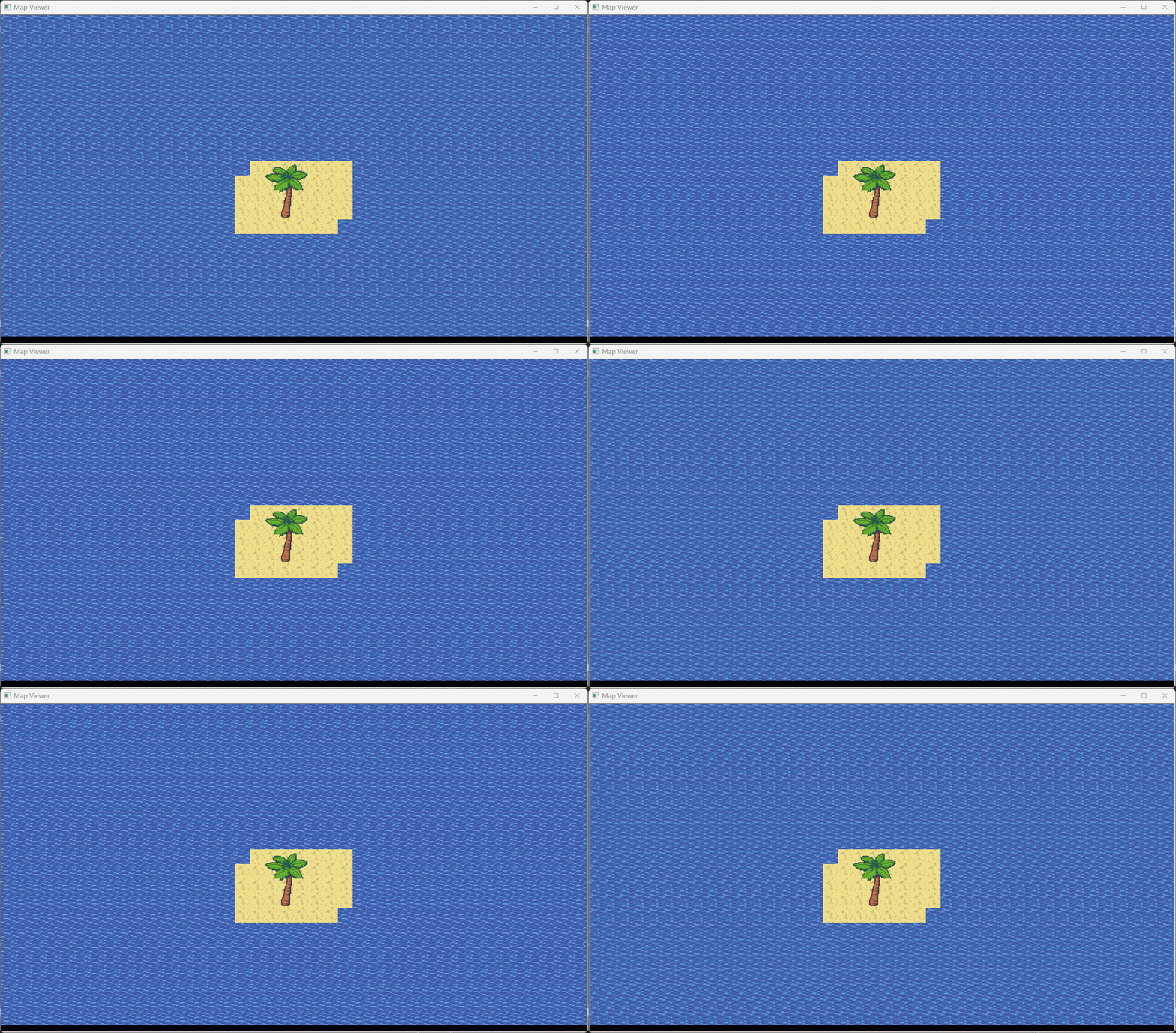
Well that was a bit insane. QOL for me!
-Sigh-
Sometimes, sometimes….
So… I find myself love making tools and QOL changes for tools than making content.. hmm.. For QOL (quality of life) changes for a programmer, there are two sections. One are code QOL changes. Compartmentalize various code pieces to make the project easier to maintain as a whole. And two, usage QOL changes. For instance, automate some kind of workflow to make using the tool less frustrating and/or to ramp up content production using that tool.
In this case, it’s the map editor. While it technically has everything I need now, I ended up going down the QOL hole. Fill layer, clear layer. Fillsets (I need to look up the new technical term) for filling a layer with a random set of tiles (like different grasses so it doesn’t look bland). And as a result… ended up revamping the animations. So initially, and how the whole thing is based on, there were 2 layers, then 4 “animated” layers, which I referred to as a single animated layer previously. The animated layers really consisted of 4 layers each, and each animation layer gets cycled through every 250 seconds.
Literally, 5 minutes before turning in for the night, I had an epiphany. Normally, I would shy away from animations because I didn’t like simple few frames animations, so I kept things simple. However… ugh. RABBIT HOLES! To make a long story short, after a code backup, I ended up working out an unlimited animation framed tile for all layers. This gives 6 full layers under and 6 full layers above players. Each tile can have it’s own animation. This should help with the water movement.
Even with the above, I am limiting the frames to 60 frames per second. Since I am locking the game to 60 FPS, this should be fine.
So… Writers would know of the terms Pantster and Plotter (outlining). For programming terms, it’s programming from the hip or using a WBS (work breakdown structure) chart. For my day job, I use a WBS chart. For home… not so much. Thanks to that stupid epiphany last night, I spent today’s session ripping all the tiling code and animated layers and replacing them with a unified tile (that can use both static and animated graphics) that can be added to any of the 12 layers.
So.. useful long term. Sucked for today’s session. Looking at my list of things I want to get done on the Map Editor before moving back to client/server… I have a few QOL to make me -NOT- go insane using this. And I need to flesh out some special tiles. aka, player, npc blocks, lights, that sort of thing. The intermediate map file format doesn’t need to change, however. So that’s good.
Map Editor Progress
Hmmm… So, I had the choice of creating the map editor in the client’s language.. Basic… or server side language, C#. Basic is seriously a massive step backwards in pretty much everything, so C# it is!
The main functionality of the map editor is mostly complete. I can place and remove tiles, animate tiles. There are basically 6 tile layers. 2 regular layers, an animation layer with 4 frames per second, then there is the objects, players, npc layers… then another animation layer with 4 frames, and two regular layers above those.
This does not include any background graphics, or clouds and other weather overhead. Next on the list before I consider the map editor basically complete.. is…
- Loading/Saving, auto numbering of maps.
- Conversion to client & server side file formats.
- Implement special tiles such as player/npc blocking, npc spawn locations, map headers like name, safe/pvp ratings, weather, etc, etc… Lights! Maybe…
Once the map editor is where I want it, then I can get back to the client/server integration and wrap up the account/character management. All of the above is to have a permanent? temporary? map for players to log into after creating their character… just to chat!
You get data! I get data! Everybody gets data!
Lookup tables and data transferred to the production database. procedures transferred. Game server droplet is configured and game server transferred. Game server connects to the new production database using an internal network connection (no $$$ this way…).
Proxy server is configured and running. It connects to the game server using an internal network connection. Game client connects to the proxy server which relays to the game server successfully.
At this point, all of the production pieces are in place and working fine.
Because I am a visual person, below is a simplified network diagram for the game:
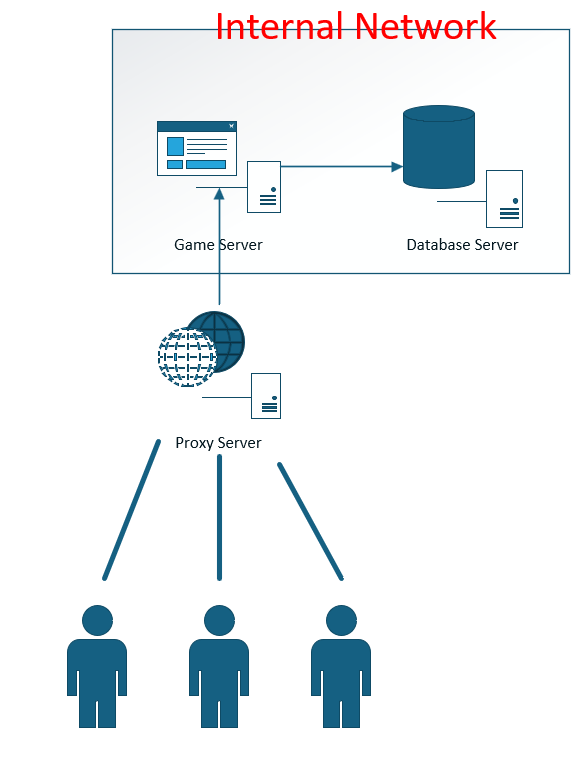
The game is small enough (even though it meets the original (and IMO, only) definition of an MMO, ability to handle 100+ concurrent players), that I saw no reason to separate out a login server and have multiple back end game servers. I believe an MMO should be one world that everyone can play in. For the younger folks, that would be like Eve Online. For those of us who have been around awhile, it would be like the multiple mmos from the 1990s.
That was pretty much it since the last post. Currently back to working on the Map Editor.
How to herp derp your way into infrastructure
A little insight into my days. I have a day job working in IT. I do a little bit of everything from programming to DBA, to server administration (Windows, and rarely Linux) to rarely cloud administration (Azure). My usual day consists of working my day job. Then after work, (sometimes) I set aside time to work on this project. I call this time “coding sessions” because that is what my time usually consists of. Coding/Programming. However, I do everything under the sun during these sessions.. I probably should call them “Sessions” rather than “Coding Sessions”.
So… in my previous post, I installed Ubuntu on a Hyper-V vm to re tackle the Steam Linux problem and got a kludge of a work around. In the past, I drummed up a Digital Ocean droplet and tackled the problem there. However, there was a cost involved that I wasn’t willing to tackle this time until I got this figured out.
I have spent time since the last post purchasing and configuring 3 digital ocean droplets. (one for database, one for game server, and one for proxy). While everything works via hyper-v, I am still working on the DO droplets.
Valve hates Linux... seriously.
Yesterday’s coding session was a.. hmmmmmmmmm
Look up Method Chaining. This was something I have found a SINGLE Nuget package uses in my few decades of using .Net. A SINGLE PACKAGE. It is that uncommon. I ran across that same package yesterday and realized how awesome such a thing is.. then promptly changed out part of my server code to use that for sending packets to the client..
Then I started wondering about implementing the same on the client side.. hmmm.
Regardless, I am using art and music from all over the place. Paid for quite a bit over the years so it’s time to put them to good use. This dude right here has some awesome artwork I have purchased and will be using. You should check him out:
Outside of coding, I get to have the joy of merging various tilesets together to get them ready for consumption in the map editor and the client itself.
So.. I figured I would spend today’s coding session tackling something that I dreaded for a long time. I have tried several times in the past, but ran into massive Steam issues on Linux. Why does that matter for this game? The server will run on Linux (or supposed to). This allows for cheaper server costs (as I will retire eventually and retirement checks are extremely small)…. Actually, I think that is the only reason.
Warning: This is a technical rant…
As a programmer, one lesson that is baked into your brain is that you never cross the bits. 32 bit programs cannot have 64 bit dependencies. And vice versa. While there are some exceptions, they are not the case here. The game server is in 64 bits. It’s dependencies are 64 bits. The Linux OS (Ubuntu) is 64 bits.
Steam for Linux… is not… well, as I found out tonight, not completely. In a sane world, when you develop an application, you package all the dependencies into a nice package, copy them onto the target machine and run it. Easy peasy, this is normal. Steam on Linux hates normal and seems to hate developers.
In order to run any game distributed (as a stand alone server) onto Linux. You must package a single 64bit library called.. libsteam_api.so. However, the game still won’t run.. no way, that would make too much sense. On you windows box, you must install something called steamcmd and force it to download a linux 64bit sdk.. which it refuses to do. It only downloads two additional 64bit SO files. Fine.
You must log into root on the hosting Linux machine and create a special folder path and upload these files to it and mark them as executable. AND then you must install 32 bit architecture (something-linux-crap-here) infrastructure junk. Then install a 32 bit linux steam client on that server. It’s a complete cluster. Literally crossing the bits.
And then and only then can you run your game.. sudo as root from a normal account or login as root just to run the stupid thing.. W..T..F.. Linux Steam is a security nightmare. Why must you go through all this crap? “Permission Denied” error on files you have permissions to and are owners of. It’s completely broken.
After reaching out to several developers, etc. Basically, it looks like Valve has decided to just.. abandon Steam on Linux in general and focus on their own distro of Linux called.. SteamOS. This is the OS used on Steam Deck, Steam Machine, etc. And all of that is client side. Nothing for server side.. literally.. nothing.. not any more.
For my other projects, I’ve used Godot for client side development. It’s great for more or less single deployment to Android, Ipads, Iphones, Windows, MacOS, and Steam Deck (did deployments on all of those). However, I am not using that for this project.. thus.. Windows only for the client.
Well.. that’s my rant.. I really really hate Linux since it really really hates everyone.

Progress.. I suppose
Server side steam authentication is tested and complete. Server is also integrated with the database and can load classes, attributes, and roles just fine. Created a server side tool to syphon the fore-mentioned data into transient files. Created a client side tool to read those files and convert them into a format the client can read.
It would really be nice if the client side language to have something like.. C#’s parallel.ForEach to read these data files as quickly as possible. But alas… working with old tech for the client side has it’s downsides..
I guess I am technically now at the tools layer of development. Yay!
Next on my list:
- Database portion of account/character management.
- Create enough of a map editor to create a temporary map for the client to have something to show on the screen when chatting.
- Finish the character management windows (create/delete/use characters)
- Finish the credits window.
- Finish the options window.
- Load tiles and temporary map in the client (and load map on the server)
- Finish the simple global/game wide chat.
hmmmm
Server side updated. Client talks to the server just fine over the network. Client can log in with itch.io authentication and server validates against the back-end itch.io api servers just fine. The client -must- be launched from with-in the itch.io client. Or else the authentication doesn’t work.
Finished.. I think, the steam authentication check on the server side. Need to test that next coding session. Once this is completed, then I can integrate the server with the database.. oh the joy…
So… since I am distributing both itch and Steam integration into the client on both platforms, you should be able to run the game from with-in either platform’s client, and it’ll log in just fine. I should probably fix that in the deployment scripts… hmm..
Finally!
Well now… Network is switched over to a new framework/stack and is 100% 64bit! yay! BASS sound system fully swapped to a new system and is in 64bit. This new system will start out with 16 channels, but I will eventually cap it at 128 channels only due to the sheer amount of SFX I am anticipating.
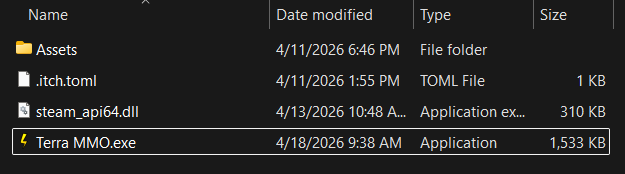
At this point, the client infrastructure is complete. As you can see in the image below, the client is only 1.5 MB. You can see the steam api and itch files, plus the Assets folder. Not too shabby.
Now I can concentrate on the server side. Speaking of which, the network portion of the server side is almost complete. I have some message handler hooks I need to wrap up. Then the server side steam integration then database integration. After all of that, then it is time to build the tools (map editor, class editor, account editor, character editor, etc.
Huh! x2
oh wow, I have not posted in a little while.. well huh… what has changed… ….
The client is restricted to Windows 10+. The client is… 64bit. And… it is now fully integrated into Steam. Yay! Well.. not Steam Deck.. however, Steam on Windows!
Things I am working on:
I am working on replacing the BASS integration with WinRT so there is no need for even more dependencies to deploy. I am also evaluating the network swap out so that networking works properly under 64bit.
Once the above 2 are finished, they will neatly round out all of the client side infrastructure stuff. This means I will then be able to return my attention to the server side as well as working on some custom tools for the game.
Huh!
Working on the client side and server side almost side by side.
Client side is in a dialect of Basic while server side is C# with mySQL for the database. Most of the scaffolding has been completed for the client side. Language, github for versioning, itch.io integration with butler scripts, hooks for Steam integration. DirectDraw/2D has been integrated, code only winsock (no activex, installations, etc). BASS integration is complete for music and sound fx.
I totally forgot how old languages/tools have squat when it comes to things I am used to in Java, C#, etc. So… I wanted some kind of consistent UI. Thus a.. “Theme” type engine support to keep things sort of looking okay. However, I am more of a.. get things working first then make it look pretty, kind of developer.
All of the above for client side is the core building blocks to build from. Next steps are the tools. Editing classes, npcs, maps, etc. These will be built as needed. The first build will allow character management and once you pick the character to use, you will be shoved into the game with only a … chat window.
This will demonstrate networking and interaction between players.
To get to that point, there is still the “fun” stuff such as all the server side coding, database fleshing out, purchasing and setting up the proxy hosting, game server hosting, database hosting. All of that fun stuff. All infrastructure stuff.
First post, yay!
Okay!!!!!!
Hello everybody! This is my first post for this mmo. This is a simple, somewhat generic FREE mmorpg for the Windows OS only (at least for now). I will be developing via itch.io and also release on Steam once I get some integration worked out on there.
This MMO is more of a quick and dirty and see if I can do it with some old school tools. More or less mimicking a mix of Final Fantasy 6 and Zelda 3 (Link to the Past).
I will be enacting the release early, release often methodology. So you will see the game grow from the very beginning.